
AI supply chain services
We build AI into your supply chain, from the ground up
Statadventure designs, builds and runs AI across your supply chain: the data foundation first, then forecasting, inventory and purchasing optimization, analytics and automated workflows, built into the way your team already works. Practical systems on your own data, with a person in charge of every decision.
Every engagement starts with a short conversation. The scope and price of each phase are agreed before it starts.
Need planning, purchasing or tariff help without AI? See all our supply chain services.
Implement
Build the data foundation and put AI into the systems and routines your team already uses.
Optimize
Better forecasts, stock levels and purchasing decisions, measured against how you plan today.
Analyze
Cost, tariff, supplier and inventory analysis that turns your data into decisions in dollars.
Automate
AI agents and workflows that take the retyping, chasing and routine checks out of planning and purchasing.
How we build AI into your supply chain
One program, in six phases. Each phase is scoped and priced on its own, and the first use case is working before the later phases start, so the value shows early and every step builds on the last.
Phase 1
Assess
We map how planning, purchasing and inventory work today, the systems and data behind them, and where AI would pay off. Then we rank the use cases by value and by how ready the data is.
You get: a map of processes, systems and data; ranked use cases with expected value and risks; a roadmap
Phase 2
Data foundation
We connect your ERP, MRP, warehouse system and spreadsheets, clean the item, supplier, order and inventory data, and set up checks that catch bad data before it reaches a model.
You get: connected data, a cleanup of the core records, data-quality checks, one agreed set of definitions
Phase 3
First models
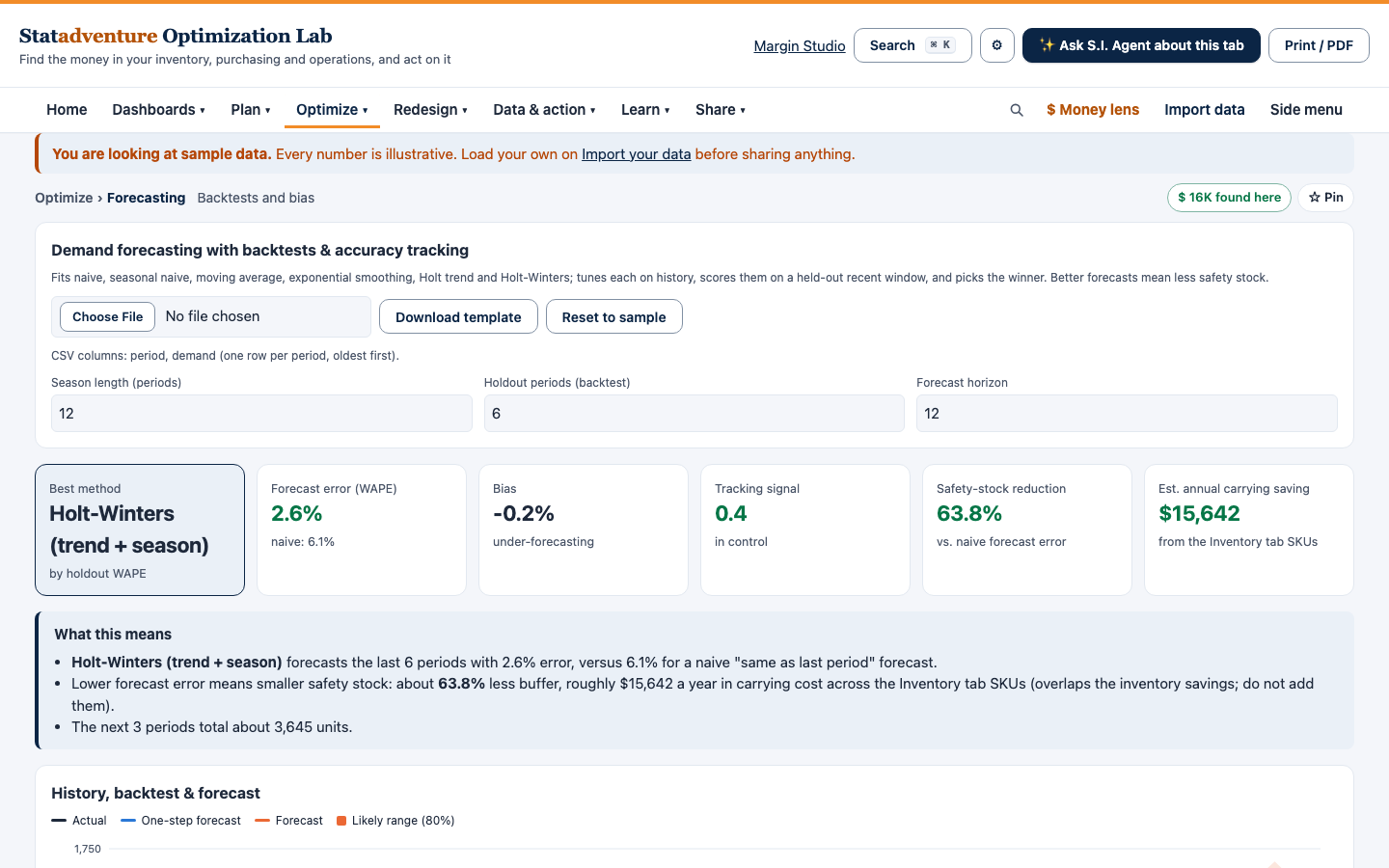
We build the first models on your history, usually demand forecasting, stock targets and supplier risk, and test them against what actually happened before anyone relies on them.
You get: working models, an accuracy report against your own history, the assumptions written down
Phase 4
Into the workflow
We put the results where people decide: planner screens, the ERP, reports and alerts, with an approval step wherever AI suggests an order, a change or a message.
You get: results in your daily tools, approval steps, a planning routine built around them
Phase 5
Automation and AI agents
We add AI agents that draft purchase orders, chase late suppliers, read order confirmations and invoices, flag exceptions and summarize the week. A person approves anything that goes out.
You get: agents for the repeated work, review rules, a log of what each agent did
Phase 6
Run and improve
We monitor accuracy and the value delivered, retrain the models as your business changes, train your team to own the system, and add the next use case from the roadmap.
You get: monitoring, retraining, team training, governance and an AI-use policy, the next use case
Where AI works in a supply chain
The use cases we build. Each one runs on data that most manufacturers and distributors already have.
Demand
- Forecasts by item and location, with the error shown
- Demand sensing from recent orders and known events
- Forecasts for new items from similar ones
Inventory
- Safety stock and reorder points from forecast error and lead time
- Balancing stock across locations
- Finding excess and dead stock, and the cash it holds
Purchasing and suppliers
- Spend classification and savings opportunities
- Supplier risk and delivery scoring
- Purchase orders drafted from the plan, for approval
Cost and trade
- Landed cost by part, with tariff scenarios
- Container fill by cube and weight
- Price and quote comparison on total cost
Planning and control
- Exception alerts: late orders, stock-out risks, demand spikes
- Support for the monthly S&OP cycle
- Dashboards with one agreed set of definitions
Documents and messages
- Reading order confirmations, invoices and packing lists
- Matching them to purchase orders and flagging differences
- Drafting supplier follow-ups for a person to send
Or start with one piece
Each service is a defined piece of work with clear deliverables. Start with one, and grow it into the full program once it proves itself.
1 · Implement
Implement AI in your supply chain
Start where AI can show results quickly, on data you already have.
AI readiness and use-case assessment
Review your planning, purchasing and inventory work and pick the one problem where AI will pay off first.
For: Leaders who want to use AI but are not sure where to start.
- You get: Ranked use-case list with expected value, data and risk notes, a recommended first project
- You provide: Process descriptions, sample reports, an overview of your systems
Data readiness
Clean and organize the item, supplier, order and inventory data that AI needs to give reliable answers.
For: Teams whose data lives in an ERP, spreadsheets and shared folders.
- You get: Data quality check, cleanup plan, cleaned core data where agreed
- You provide: Exports from your ERP or spreadsheets, a data contact
AI pilot and rollout
Build the first use case on your data, test it against today’s results, then put it into your team’s routine.
For: Companies ready to move from AI ideas to a working tool.
- You get: Working pilot, results compared with your current process, rollout plan, training and handover notes
- You provide: A named owner, access to the data, time from the people who will use it
2 · Optimize
Optimize inventory, forecasting and purchasing
Use AI and statistics to make planning decisions better, and show the gain in dollars.
AI demand forecasting
Forecasts by item from your sales history, with the error shown, so planners can check them and adjust.
For: Planners forecasting in spreadsheets or by feel.
- You get: Forecast by item, accuracy check against past months, a monthly update routine
- You provide: Demand history by item, known promotions, price changes or events
Inventory optimization
Set safety stock and reorder points by item from forecast error and lead time, to cut stockouts and excess stock together.
For: Manufacturers and distributors buying to stock.
- You get: Stock targets by item and location, the cash released or service gained, a review routine
- You provide: Demand history, current stock, lead times, service-level goals
Purchasing and supplier optimization
Find where purchasing money goes and which suppliers, terms and order sizes cost you the most.
For: Buyers and finance teams without a clear spend view.
- You get: Categorized spend, supplier comparison on total cost, savings opportunities ranked
- You provide: 12 months of PO or AP data, a supplier list, delivery records
3 · Analyze
Analyze cost, risk and performance
Turn your data into a clear view of where money and risk sit in the supply chain.
Landed cost and tariff analysis
Show what duty, freight and supplier choices add to cost per part, with what-if cases for tariff changes.
For: Teams importing parts or finished goods.
- You get: Landed-cost model, tariff scenarios, exposure by part and country of origin
- You provide: Parts with supplier, origin, HTS codes if known, freight costs
Supplier risk analysis
Rank single-source, long-lead and late-delivery risks and outline backup options.
For: Teams with concentrated or unreliable supply.
- You get: Risk ranking, backup-option shortlist, actions with owners
- You provide: Spend by supplier, critical parts, delivery history
Supply chain analytics and KPI dashboards
Agree how service, inventory, cost and supplier KPIs are calculated, then build a dashboard everyone trusts.
For: Leaders getting different numbers from different reports.
- You get: KPI definitions, a dashboard on your data, a weekly review format
- You provide: Current reports, access to the data, time with process owners
4 · Automate
Automate the manual work
Use AI to take the retyping and routine checks out of planning and purchasing, with a person reviewing what goes out.
Workflow automation
Automate repeated steps such as keying purchase orders, checking order confirmations and building weekly reports.
For: Teams retyping documents or rebuilding the same report every week.
- You get: Documented workflow, an automated version, human review steps
- You provide: Example documents, the current steps, system access
AI assistants and agents for planners and buyers
Set up AI agents that flag exceptions, summarize supplier messages and draft routine replies and orders for a person to approve.
For: Small teams with more exceptions and e-mail than time.
- You get: Configured agents, review rules, a short AI-use policy for your team
- You provide: Example messages and reports, your rules for what needs approval
AI policy and team training
Simple rules for using AI with company data, and hands-on training for the people who will use it.
For: Companies whose teams already use AI tools without clear rules.
- You get: AI-use policy draft, training session, a list of approved uses
- You provide: Current policies, an IT contact, the team’s questions
Practical AI, with a person in charge
Most useful AI in a supply chain is unglamorous: a forecast a planner can challenge, cleaner item data, fewer hours retyping orders. We build it that way on purpose.
- One named owner for every AI use case.
- A person reviews anything that goes to a customer, a supplier or the shop floor.
- Results are measured against how you work today.
- No software recommendation until the problem and the data are clear.
- We build on the systems you have: ERP, MRP, spreadsheets and shared folders.
Software and services together
Keep it running with the Optimization Lab
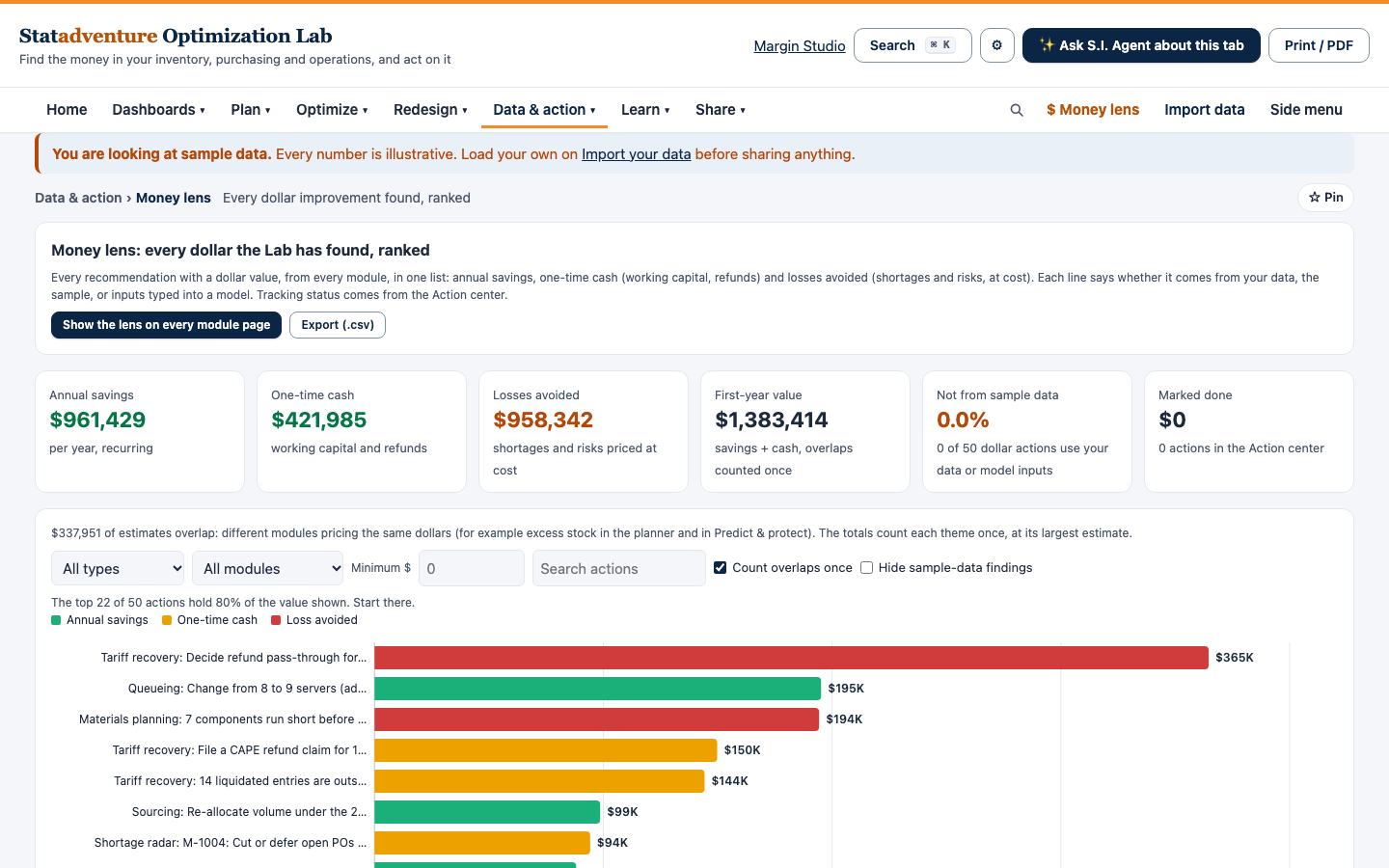
Where it fits, we build on the Statadventure Optimization Lab, our supply chain planning software, so forecasts, reorder points and the savings list keep updating on your own data after the project ends.
More detail
AI services
Supply chain and purchasing
Who it’s for
- Manufacturers and distributors with 50 to 250 people
- Operations, planning and purchasing leaders asked to “do something with AI”
- Teams with an ERP/MRP whose data or planning output they don’t fully trust
- Companies that want results they can check, not a large transformation program
How an engagement works
- Contact us with a few lines on what you want to improve.
- Short conversation about your data, systems and goals.
- Scoped proposal with deliverables and timeline, in writing.
- Build in small steps, checked against your current results.
- Handoff with documentation and training, plus optional ongoing support.
More on working with consultants
- Supply chain services for small businesses: what to outsource and what to keep
- When to bring in a manufacturing operations consultant
- Inventory optimization consulting for small and mid-size manufacturers
- 12 questions to ask before hiring a supply chain consultant
- What does a supply chain consultant actually do?
- Supply chain consultant or full-time hire? How to decide
Questions
What does building AI into a supply chain from the ground up involve?
Six phases: assess where AI pays off, build the data foundation, build and test the first models, put the results into your team’s daily tools, add AI agents for the repeated work, then run and improve it. Each phase is scoped and priced on its own, and you can stop after any of them.
What does AI actually do in a supply chain?
It forecasts demand from your history and known events, sets stock targets, flags exceptions such as late suppliers or items heading for a stockout, reads and drafts routine documents such as purchase orders and supplier e-mails, and finds patterns in cost and spend data. A person stays in charge of the decisions.
Do we need clean data or a data team before we start?
No. Most projects start from ERP exports and spreadsheets. Building the data foundation is part of the work, and we train your people to run it. Sometimes the most useful early result is cleaner item and supplier data.
Do we have to buy new software?
No. We build on the systems you already use. If software would help, we say so only once the problem and the data are clear, and that includes our own Optimization Lab.
How much does it cost?
Each phase is scoped and priced after a first conversation, before any work starts. You know the deliverables, timing and price up front.
Do you guarantee savings?
No. We measure results against how you work today and report them as they are. Outcomes depend on your data, decisions and follow-through.
Is the tariff and duty work legal advice?
No. Duty and customs items are organized data, not legal advice. We prepare the questions for your customs broker or counsel.
Bring us one supply chain problem
We will tell you plainly whether AI can help, what it would take to build, and where to start.