
A production schedule in a spreadsheet goes out of date the moment a part arrives late or a machine goes down. Production Planning, new in the Statadventure Optimization Lab, places every operation on every machine and plans the rest again around each change. It costs $99 a month, on its own or added to any Lab plan.
Twelve pages for the shop floor
Production Planning has its own menu in the Lab:
- Overview: orders by status, delivery performance, output against plan, load, OEE, delays with their causes, and what to act on.
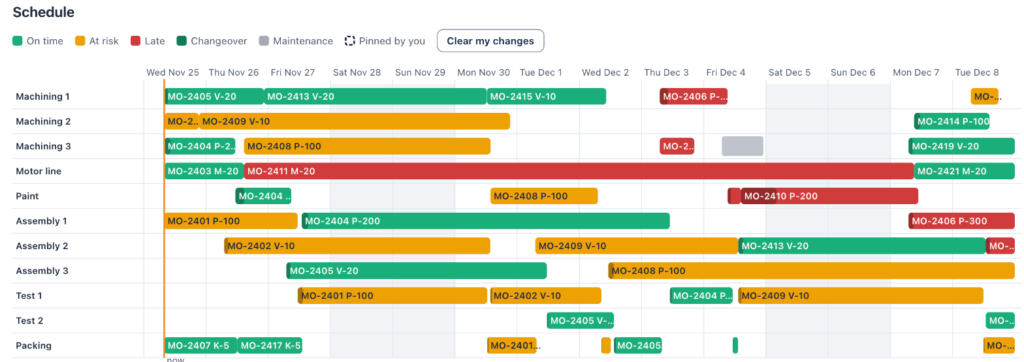
- Production schedule: a Gantt chart by machine or by order, a week by day and the dispatch list. Drag a bar to move an operation.
- Production orders: create, release, hold and complete orders, and report progress from the floor.
- Demand forecasting: what to produce over the next 7 days to 12 months, against the hours each work center has.
- Materials planning: for each order, the components that are ready, waiting or short, and what to buy.
- Capacity planning: load by week, the bottleneck, planned maintenance and priced ways to add capacity.
- Cost optimization: estimated against actual cost by product and by order, and where to save.
- Scenario simulator: the whole schedule run again with a change, such as more demand, a supplier delay, a breakdown, overtime, an extra shift or outsourcing.
- Quality control: scrap, rework, first-pass yield, inspections and defects that keep coming back.
- Reports: eleven reports to print as PDF or download as Excel or CSV.
- AI production assistant: answers common questions from your own plan, such as what to make next and what is at risk. Actions it suggests wait for approval and are recorded.
- Settings and integrations: work centers, routings, people, the plant calendar, rates and file templates.
How the schedule is built
Each operation goes on the machine that can finish it first. It starts after the step before it and once its materials are in, inside the work center’s shifts and around planned maintenance. Jobs in the same changeover family skip their setup when they run back to back.
Materials come from stock first, then open purchase orders, then production orders that make the component. A component that nothing covers is marked short and listed to buy.
The Lab chooses the order sequence itself. It tries four rules (priority, earliest due date, critical ratio and least slack), keeps the best, then improves it by swapping neighboring orders. On-time delivery comes first, then fewer changeover hours. Drag an operation to another time or machine and it stays there; everything else is planned around it, and any conflicts are listed.
It uses the data you already have
Production Planning reads the items, bills of materials, stock, open purchase orders, forecasts and open customer orders already in the Lab, so nothing is entered twice. Dates confirmed through supplier confirmations flow into the materials check.
What it adds is work centers, routings and production orders. Six files can be imported from Excel or CSV: work centers, routings, production orders, shop-floor reports, machine stops and inspections. Templates for each are on the Settings page.
Until you load your own data, every page runs on a sample pumps-and-valves plant, so you can try each step first.
What it does not do yet
It does not read live machine or IoT feeds; progress comes from shop-floor reports and files. People are checked against the schedule by skill, but they are not scheduled as a hard limit. Late orders are shown with their delay, not given a cost.
Price and plans
Production Planning is $99 a month, or $950.40 a year paid yearly. On its own it includes one user, one workspace and Excel or CSV import. Teams on the Basic, Planner or Growth plan can add it for $99 a month.
On its own and on Basic, bills of materials are loaded as a file. The full materials requirements planning (MRP) page is part of the Planner and Growth plans. Every page is open in the live demo, with no account.
Plan every operation on every machine, and plan again when things change.
Try the Statadventure live tools
Inventory tools for US manufacturers: reorder point, safety stock, EOQ and landed cost, with the inputs and assumptions shown.
Open the live tools